The inspector goes to the field. The evidence comes back with them.
An app that captures photo, video and audio with GPS, date and time at capture, keeps track of where every file came from, runs your operation's questionnaire and draws the sketch on the map, all offline. When it reconnects, it becomes an auditable report on its own.
Your most important inspection lives on a personal phone.
The inspector shoots through WhatsApp, takes notes on paper and dumps the image into a drive. Later, nobody can vouch for where the photo came from, when, or who took it. In the field without signal, it gets worse. When someone disputes the result, the evidence is a signed sheet of paper that does not hold up.
From request to report, even without signal.
- 1 The request lands in the app. Category, questionnaire, location and participants already set, ready to head to the field.
- 2 The inspector goes to the field. The app works offline, with no need for network at the inspection site.
- 3 Capture with provenance. Photo, video and audio with GPS, date and time. The questionnaire guides item by item.
- 4 Syncs and generates the report. When it reconnects, the inspection syncs and the auditable report comes out ready, with the chain of custody attached.
Everything the inspector takes to the field, in a single app.
From capture to cost control, the entire job happens inside the inspection, not across loose spreadsheets and chat groups.
The photo is born as evidence, it does not become evidence later.
Every piece of media comes out with date, time and its origin recorded (camera or gallery, plus the device), so there is no arguing about where it came from. At the end, whoever was on site signs the inspection by touch or by video, and the signature ties the person who validated it to the evidence, inside the same chain of custody.
- Photo, video and audio with date, time and origin recorded
- Signature by touch or by video, tied to the inspection
- Inspection route and distance recorded for audit
The cost of the job closes inside the inspection itself.
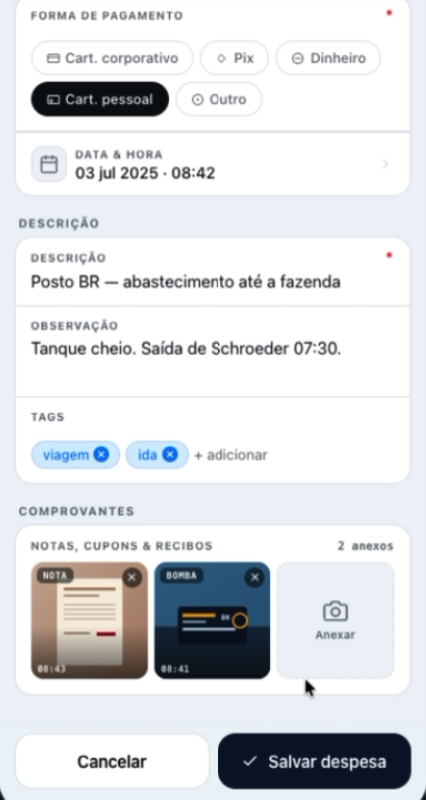
The inspector logs fuel, tolls and per diem on the spot, with a photo of the receipt attached, and the route traveled goes in with it. Each expense stays attached to the inspection that generated it, so what it cost to go to the field is measured without a separate spreadsheet or a receipt hunt afterwards.
- Expenses logged in the field, with a photo of the receipt
- Each cost attached to the inspection that generated it
- Route and distance count toward the travel cost

Your operation's questionnaire, built once, in every inspection.
You build the questionnaire by dragging fields, photo and geolocation, with conditional logic, without depending on IT. Each type of inspection gets its own template, and it repeats exactly the same from the first field visit to the thousandth. In the field, it guides the inspector item by item, requires what cannot be missing and renders natively, even offline.
- Visual editor, from photo field to geolocation
- Conditional logic: branches that appear based on the answer
- One template per type of operation, reused in every inspection
The sketch is drawn on the map, even where there is no network.
The inspector marks the perimeter, the points and the measurements right on the map, with GeoJSON and KML layers and the map loaded for offline use. The route traveled and the distance are recorded with the inspection, so the sketch is not a loose drawing: it is georeferenced evidence that enters the same chain of custody.
- Perimeter and points drawn on the map
- GeoJSON and KML layers, with offline maps
- Route and distance recorded with the inspection
The field is one part. Control belongs to the platform.
On-site inspections enter the same queue and the same workspaces as the other modes. The one who pays is the one who controls what each inspection releases.
The hard facts, straight.
For whoever evaluates risk, compliance or integration and wants the specs without the runaround.
The on-site inspection
- Works offline, syncing when it reconnects
- GPS, date and time at capture
- Origin of every piece of media recorded (camera or gallery, plus device)
- Questionnaire with conditional logic (SurveyJS)
- Sketch on the map, with GeoJSON and KML layers and offline maps
- Signature by touch and by video
- Expenses with receipt photo, per inspection
- Speech to text during field capture
The platform
- Document bureau checks (individuals and companies)
- API and webhooks for B2B integration
- Inspection batches via Excel
- 2FA on inspector access
Any technical inspection that requires being on site.
Crop and rural property inspection. Construction, industry, oil and gas. Hazardous areas. Telecom and towers. Property and field assets.
The evidence is born trustworthy at capture.
Every photo comes out with its provenance, and the inspection carries route, questionnaire and signature in the same chain of custody. With document bureau checks (individuals and companies), anti-fraud stops being talk: it is capture with provenance plus verified documents. More than 100,000 inspections accumulated, and more than 15,000 per crop season, to the same standard, proven at scale in Brazil. The report stops being a signed sheet of paper and becomes evidence that holds up when disputed, and the buyer controls what it releases.
"I already use a checklist app."
A checklist digitizes the form and stops there. Here there is capture with provenance (date, time and origin recorded), chain of custody and a report that withstands dispute. Where there is a counterparty (policyholder, repair shop, tax authority, client), ticking boxes is not enough: you need to prove where each piece of evidence came from.
Three modes, one standard
On-site, remote or done by the customer: the same platform, the same chain of custody and the same report that holds up when disputed.
Take evidence to the field, not WhatsApp.
Talk to the team and see the inspector app running in your operation.